
How to Program a Hardie Irrigation Rain Dial (Quick Start)
The hardie irrigation rain dial is one of the most trusted sprinkler controllers ever made — and if you need to program one fast, here’s what you need to know:
Quick Programming Steps:
- Install a 9V alkaline battery — enables “armchair programming” and clock backup
- Set current time and day — use the function dial and +/- buttons
- Set station run times — 1-59 minutes or 1-5.9 hours per station
- Set start times — up to 3 per program (A, B, C), 9 total per day
- Choose your watering schedule — any weekday, skip days (1-31), or odd/even dates
- Turn the dial to Run — your schedule is live
The Rain Dial-R Series (sold under both the Hardie and Irritrol brands) supports 3 independent programs, up to 12 stations, and features like Rain Delay, Water Budgeting, and weather-based scheduling.
Whether you just bought a replacement unit, inherited an existing system, or are troubleshooting a frustrating display error, this guide walks you through everything — from basic setup to advanced scheduling.
I’m Jacob Reese, VP of Standard Plumbing Supply, and after years of helping contractors and DIYers source and set up irrigation equipment — including the hardie irrigation rain dial — I know exactly where people get stuck. This guide will get you unstuck fast.
Understanding Your Rain Dial-R Series Models
The hardie irrigation rain dial has evolved over the years, but its core DNA remains the same: reliability and simplicity. Today, you will most commonly find the Rain Dial-R Series, which carries on the legacy of the original Hardie and Irritrol designs. These controllers are built to perform season after season, which is why they come with a robust 5-year warranty.
The Lineup: RD600, RD900, and RD1200
When selecting or identifying your model, the number tells you exactly how many “stations” or “zones” the controller can manage:
- RD600: Supports up to 6 stations.
- RD900: Supports up to 9 stations.
- RD1200: Supports up to 12 stations.

Indoor vs. Outdoor Models
There is a key difference between the “INT” (Indoor) and “EXT” (Outdoor) versions. Outdoor models are housed in a weather-resistant, locking plastic cabinet with an internal transformer. Indoor models typically use a plug-in transformer and should be mounted in a protected area like a garage or shed, within five feet of a 120V outlet.
The Modular “Armchair” Design
One of our favorite features at Standard Plumbing Supply is the modular design. The entire control module can “snap out” of the housing. This allows for “armchair programming”—you can sit on your couch with a 9V battery plugged into the module and set your entire schedule before ever mounting it to the wall. This is a lifesaver during the hot summers in places like Peoria, Arizona, or Mesa!
For a deep dive into the technicalities, you can view the Official Rain Dial-R User Guide.
Step-by-Step Programming for the Hardie Irrigation Rain Dial
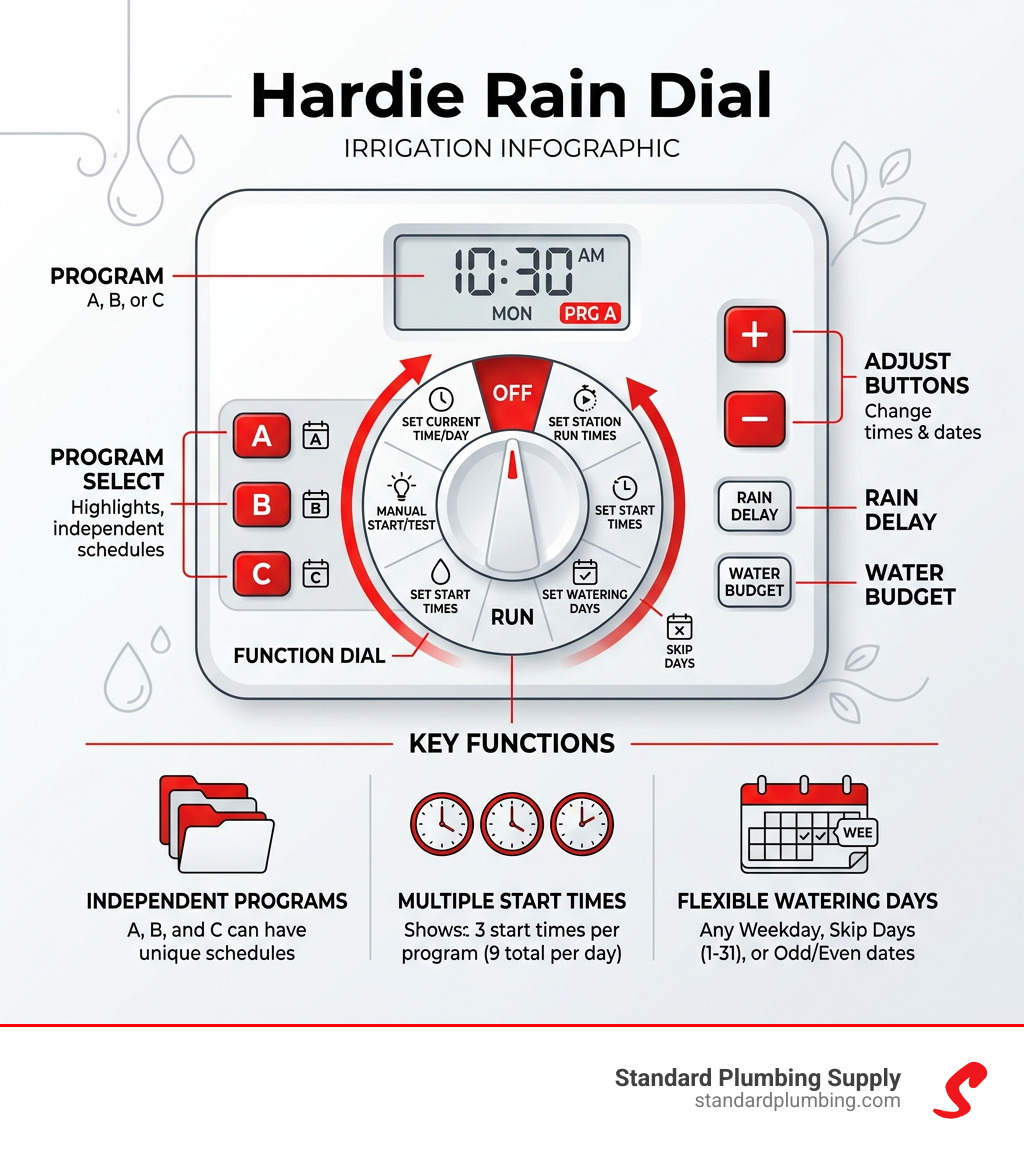
Programming the hardie irrigation rain dial is a logical process. The controller uses three independent programs (A, B, and C). Think of these as three separate “folders.” You might use Program A for your lawn, Program B for your flower beds, and Program C for your drip-irrigated trees.
1. Set the Current Time and Day
Turn the dial to Current Time/Day. Use the + and – buttons to adjust the minutes and hours. Pay close attention to the AM/PM indicator! To set the day, press the Next button until the correct day of the week is flashing, then move the dial to the next position.
2. Set Station Run Times
Turn the dial to Station Run Times. Ensure you have selected the correct program (A, B, or C) using the program switch. Each station can run from 1 to 59 minutes or 1 to 5.9 hours. If you don’t want a station to run on a specific program, set its time to “OFF.”
3. Set Program Start Times
Turn the dial to Start Times. Each program can have up to 3 start times per day. This is particularly useful for new sod that needs short, frequent watering. If you only need one start time, ensure the other two are set to “OFF.”
4. The 9V Battery Secret
Always install a fresh 9V alkaline battery. While the controller has a “Super Cap” that maintains the time and date for about 24 hours during a power outage, the battery ensures your non-volatile memory stays intact and allows you to program the unit while it’s disconnected from the wall.
If you are a visual learner, we highly recommend you Watch the programming tutorial to see these steps in action.
Optimizing Your Hardie Irrigation Rain Dial with Smart Logic
The “R” in Rain Dial-R stands for “Remote Ready,” but it also signifies the unit’s ability to become a smart controller.
- SMRT Logic®: By adding the SMRT Logic gateway, you can control your hardie irrigation rain dial from your smartphone or tablet. This is perfect for our customers in Salt Lake or Boise who want to turn their sprinklers off from work when a surprise rainstorm hits.
- CLIMATE LOGIC®: This system consists of a weather sensor and a receiver. It monitors local weather data and automatically adjusts your watering run times based on real-time evapotranspiration (ET) rates. It’s like having a professional landscaper constantly tweaking your dial for maximum efficiency.
For those looking for a “cheat sheet,” the Quick Reference Guide is an excellent resource to keep taped inside your controller cabinet.
Advanced Scheduling and Water Management
Once you have the basics down, you can dive into the features that make the hardie irrigation rain dial a professional-grade tool.
Water Budgeting
This feature allows you to increase or decrease the run times of all stations in a program by a percentage (from 0% to 200%) without changing each station individually. As the seasons shift in regions like Colorado or Idaho, you can easily scale back to 70% in the fall or jump to 120% during a July heatwave.
Rain Delay
If rain is in the forecast, you don’t have to turn the controller off and risk forgetting to turn it back on. Turn the dial to OFF, press the + button to select the number of days you want to skip (up to 9 days), and then turn the dial back to RUN. The controller will count down and resume its schedule automatically.
Well Recovery and Stack/Overlap
For our customers on well systems, the Well Recovery delay (adjustable from 1 second to 2 hours) provides a pause between stations to allow the well or cistern to recharge. Additionally, the Stack/Overlap feature allows you to decide if programs should run one after another (Stack) or simultaneously (Overlap), provided your water pressure can handle it.
When upgrading your system, consider high-quality components like the Rain Bird pop-up spray head to ensure your water is distributed evenly.
Customizing Watering Days
The hardie irrigation rain dial offers three ways to schedule your watering days to comply with local water restrictions in places like California or Nevada:
- Weekday Schedule: Pick specific days of the week (e.g., Monday, Wednesday, Friday).
- Skip Days: Set an interval from 1 to 31 days.
- Odd/Even Dates: The 365-day calendar allows you to water only on odd or even dates, which is a common requirement in many municipalities.
For larger turf areas, pairing your controller with a K-Rain Pro-Plus Rotor can provide the heavy-duty coverage your lawn needs.
Installation and Electrical Specifications
Installing the hardie irrigation rain dial is straightforward, but electrical safety is paramount.
Wiring and Power
- Transformer: The unit uses a 120V AC input and outputs 24V AC at 1.25 amps.
- Station Output: Each station can handle up to 0.5 amps (roughly two solenoids).
- Total Load: The total load to all valves, including a Master Valve or Pump Start Relay, should not exceed 1.0 amp.
The Importance of Earth Ground
For surge protection, especially in lightning-prone areas of the Mountain West, connecting the earth ground wire is non-negotiable. This protects the sensitive modular electronics from power surges.
Master Valve and Pump Start
The Rain Dial allows you to assign a Master Valve or Pump Start per station. This is vital if part of your system uses street pressure while another part (like a large hill) requires a booster pump. If you are running an impact-style system, the Rain Bird Maxi-Paw Impact Rotor is a classic choice that pairs well with the Rain Dial’s reliability.
Troubleshooting Common Hardie Irrigation Rain Dial Issues
Even the best systems run into hiccups. Here is how to handle the most common issues we see at Standard Plumbing Supply.
The “FUS” Error
If your display shows “FUS” alternating with a station number, the controller’s diagnostic circuit breaker has detected an electrical short on that station.
- What to do: The controller will automatically skip the shorted station and continue with the rest of the program. You should inspect the wiring for that specific station and check the solenoid for damage.
Blank Display or “OFF” Flashing
A blank display usually indicates a power loss. Check your circuit breaker and the transformer. If “OFF” is flashing, it often means the controller has detected a major short or the rain sensor is active and preventing operation.
Fail-Safe Mode
If the controller loses all power (AC and battery), it defaults to a “Fail-Safe” mode once power returns. This runs every station for 10 minutes every day at 7:00 AM. If your sprinklers are running at odd times and you didn’t program them that way, check your battery!
For drip zones, we often recommend the Rain Bird Drip Tubing Stake to keep your emitters exactly where they belong while you troubleshoot your system.
Frequently Asked Questions about the Rain Dial
What does the FUS error mean on my display?
The FUS error stands for “Fuse” or a triggered circuit breaker. It means there is an electrical short circuit in the station wire or the valve solenoid for the station number displayed. The Rain Dial is smart enough to bypass the “bad” station so the rest of your yard doesn’t die while you fix the problem.
How do I set a Rain Delay during a storm?
To set a Rain Delay, turn the function dial to OFF. Press the + button to select how many days you want the system to stay off (1-9 days). Then, turn the dial back to RUN. The display will show the delay and count down the days until it automatically restarts.
Can I upgrade my old Hardie controller to a smart system?
Yes! If you have an older hardie irrigation rain dial, you can often simply replace the internal module with a new Rain Dial-R module. This gives you immediate access to Climate Logic® and SMRT Logic® features without having to rewire your entire valve box.
Conclusion
The hardie irrigation rain dial remains a staple in the irrigation world because it just works. From the simple RD600 to the expansive RD1200, these controllers offer the perfect balance of old-school durability and new-school “smart” features.
At Standard Plumbing Supply, we are proud to support homeowners and contractors across the West—from the sunny streets of Phoenix and San Diego to the mountain communities of Jackson and Park City. With our 5-year warranty on Rain Dial-R Series controllers and our expert staff, we are here to ensure your landscape stays green and your water bill stays low.
If you need parts, advice, or a full system upgrade, use our store locator to find a location near you. Whether you’re in Bountiful, Utah, or Sacramento, California, we have the inventory to help you get the job done right. Don’t forget to Shop Sprinkler Fittings and Couplings to ensure your installation is leak-free and professional.
Happy watering!
